You can search for the "technical information" and "how to use" manuals.
Services FAQ
Business and Services
What are the benefits of using meviy?
- meviy is a 3D manufacturing platform that allows parts that previously had to be ordered using 2D drawings to be quoted, ordered and manufactured using only 3D data. Therefore, designers and buyers can significantly reduce the effort required to manage drawings, delivery dates and quality.
- In addition, errors in the creation of 2D drawings and errors in the generation of standard product preparation part numbers can be completely eliminated.
Do I have to install software in order to use meviy?
- Besides installing a compatible Internet browser (such as(Google Chrome or Microsoft Edge)), there is no additional software needed.
- There is no need for any setup by the customer, even when we upgrade the service.
How do I use meviy?
Learn about making a new account (free) or granting permissions here.
Can you provide quotations even outside of Misumi's business hours?
- Yes. You can use meviy 24 hours a day, 365 days a week.*
- *There may be occasional service interruptions during system upgrades and other maintenance.
How long will uploaded data be saved?
Is the uploaded data kept secure?
- It is carefully handled on our own servers. We share manufacturing information with our collaborating factories during manufacturing, but it is not used for any purpose other than manufacturing.
- However, please be aware that we may use uploaded data statistically when considering expanding our service coverage in the future.
System
What 3D CAD data formats can be used?
- Most major native and neutral file formats are supported.
- ◆ Neutral file formats:
STEP (.step/.stp), Parasolid (.x_t/.x_b/.xmt/.xmt_txt), ACIS (.sat/.sab), JT (.jt), PRC (.prc) - ◆ Native file formats:
Autodesk Inventor (.ipt), CATIA V5 (.CATPart), Creo (.neu/.prt/.xpr),
Pro/Engineer (.prt/.neu/.xpr), Siemens PLM-NX (.prt), SolidEdge (.par/.pwd), SolidWorks (.sldprt), I-deas (.arc/.unv), iCAD SX (.icd)*
*iCAD SX (.icd) is only supported for FA mechanical parts. - Please also check the compatible CAD file formats.
Do automatic quotations work for 2D data?
- Unfortunately, 2D CAD data is not supported by meviy, so 2D CAD data estimates are provided by a custom order team that handles non-catalog standards.
- Please contact them using the information below:
- ◆ FA custom order team
- +49 69 668173-499
- Business hours:Monday-Thursday 8:00-17:00 h, Friday 8:00-16:00 h
- *Closed for holidays, Obon, and the New Year holidays
- *Please also provide your customer code and estimated quantity when making an inquiry or request.
How is an automatic quotation generated?
- It is calculated using the latest 3D shape recognition technology.
- First, the 3D model is broken down into different shape elements, then the manufacturing process for each shape is identified. Price and lead time is automatically calculated for each process, and then a quotation is made.
Is Internet Explorer compatible with Google Chrome or Microsoft Edge when using meviy?
Does meviy work on Windows XP?
Quotations and Orders
Are quotations free?
Features and User Guides
Can CAD data be edited on meviy?
Can the part names from an assembly file be transferred to the part names in meviy?
- Automatic entry is not currently possible, but they can be changed. Using Solidworks as an example for automatic project name changing, the process is as follows:
- (1) Design
- (2) Assign the name you would like to “Solid body” for each part in the assembly.
- (3) Save as STEP.
- (4) Upload to meviy, get a quotation, order.
- Following this workflow, the part name will now reflect the part name you specified.
- *Information for other CAD files will be added as soon as they are confirmed.
If I have a quotation made from a file with multiple parts, is it possible to only order some of them?
- Yes, you can.
- In the Parts List, move the mouse over the part you do not want to order and select “Move to Do Not Order”. The selected parts will be removed from the Order List.
- Removed parts will be moved to the “Do Not Order” column, but can be added to the Order List again by selecting “Move to Order List” on the part.
FA Mechanical Parts FAQ
Product Information for Sheet Metal Parts
What kind of sheet metal parts can be quoted? Are there shapes that meviy cannot handle?
Please click here for more information on applicable shapes, sizes and materials.
There is also information about shapes not handled by meviy.
Can dimensional tolerances be specified?
Currently only general tolerances are supported. If you would like to change the tolerances, please send a request for a quotation to meviy support and describe your tolerance request in the Comment column (other additional instructions).
What is the lead time of an ordered product?
- As a general rule, the earliest shipping dates will be 3 days from ordering for products with no surface treatment, and 5 days for products with surface treatments (painted/plated).
- For flat plate products without bending, urgent one-day shipping is available (additional express charge applies).
Product Information for Welded Sheet Metal Parts
Q. Is welding possible between plates of different thicknesses?
- A. Yes, welding between two different sheet thicknesses is supported.
- Please combine the 3D data with different sheet thicknesses into a single file and upload it to meviy.
- For modeling rules and detailed guidelines, please refer to the URL below
- <Shapes Eligible for Quotation>
- https://us.meviy.misumi-ec.com/help/en/technical_info-en-c/swd_shape-material-en-c/33119/
- <Basic Modeling Rules>
- https://us.meviy.misumi-ec.com/help/en/technical_info-en-c/swd_guideline-en-c/33177/
Q. What types of CAD files are eligible for sheet-metal welding quotations? I sometimes get an “upload not allowed” message and I’m not sure why.
- A. The supported CAD file formats are the same as those for the existing sheet metal service.
- For details by CAD system, please refer to the manual below.
- < Uploadable CAD File Formats>
- https://us.meviy.misumi-ec.com/help/en/operation_manual-en-c/first-en-c/9739/
- Please note that assembly formats consisting of multiple files (such as. SLDASM) are currently not supported on meviy.
- Instead, please re-save your data in a format where multiple solids are contained within a single CAD file, such as. SLDPRT or Parasolid (.x_t), and then upload it to meviy.
If the issue persists, please check whether your file contains 16 or more sheet metal parts in a single CAD file.
The Welded Sheet Metal service supports quotations for up to 15 parts per product.
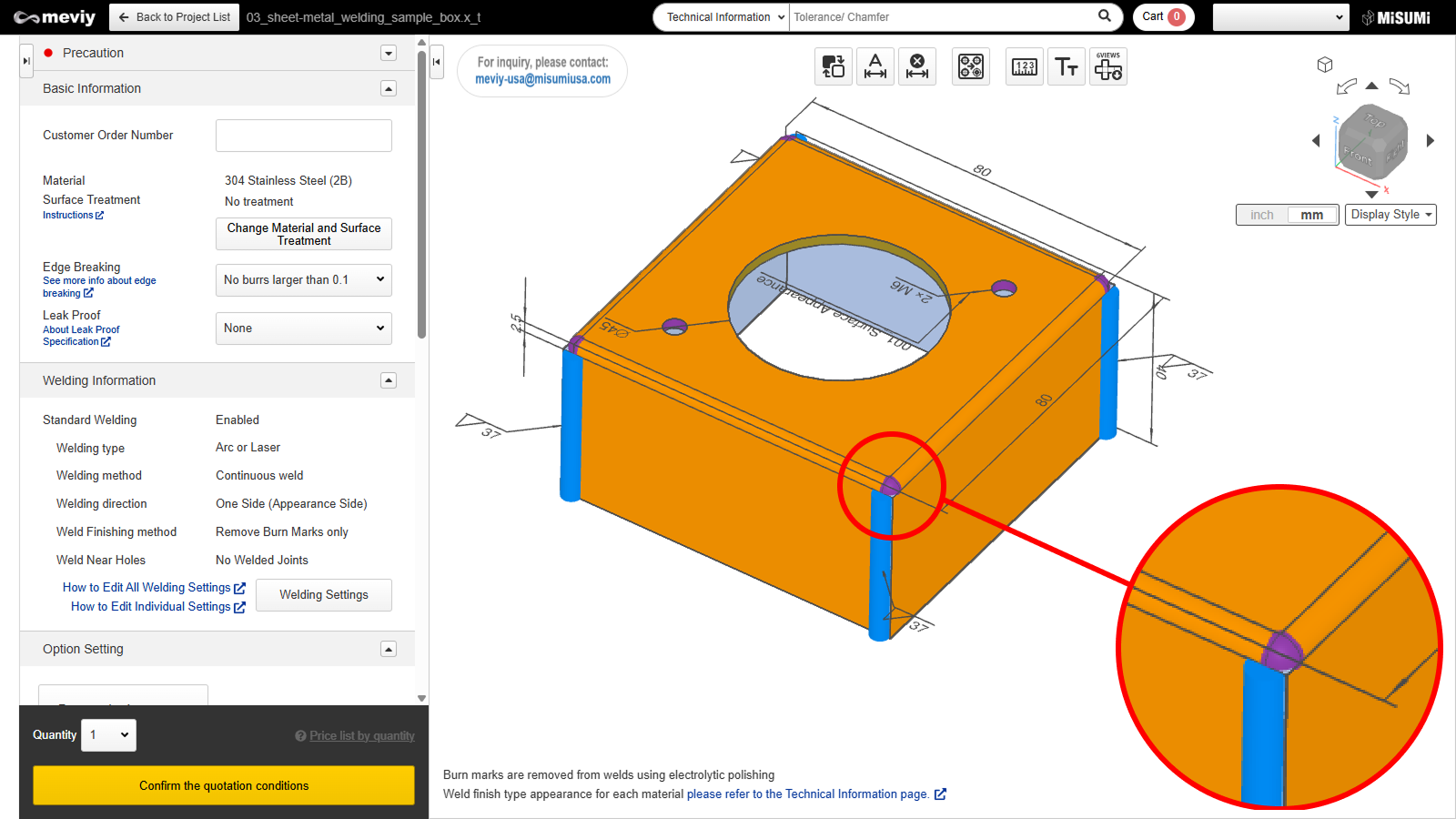
Q. I want the corner of a box-shaped part to be filled by welding. How should I specify this?
- A. If you want corner welding (hole-filling welding), we recommend the following modeling conditions:
- ① the notch size is within twice the sheet thickness (per side), and
② the angle where the bend and the weld intersect is 90 degrees or greater. - Corner areas eligible for hole-filling welding will be highlighted in purple in the 3D Viewer.
- Manual: https://us.meviy.misumi-ec.com/help/en/technical_info-en-c/swd_guideline-en-c/33177/
Q. The R-shaped (radius) area is not highlighted. Will it still be welded?
- A. meviy cannot recognize weld locations between two curved surfaces.
- For example, if the thickness face of one part is close to the inner curved surface of a bent area on another part, that area will not be recognized as a weld location and therefore will not be highlighted in the 3D Viewer.
- Such areas are also excluded from welding during manufacturing.
Q. The welded structure was split into separate parts. What is the cause?
- A. Please check whether the distance between the component parts is too large.
- If there is no area where parts are within 0.15 mm of each other (i.e., no recognizable welding area), the model will be split into separate projects, even if you are quoting it as a Welded Sheet Metal product.
Q. Can I apply different welding instructions to multiple weld locations within the same model?
- A. Currently, This is not supported in automatic quotation.
- Welding conditions set in Edit Welding Information are applied to all weld locations recognized by meviy.
- If you require different welding conditions by location, please describe the details in the Additional Instructions field and request a manual quotation.
Q. Is nut installation supported?
- A. Yes, nut installation is supported.
- Nut installation is already available in the sheet metal parts service, and it is also supported in the Welded Sheet Metal service via the Hole Type Selection screen with automatic quotation.
Important notes:
- If a nut geometry is included in the 3D model, it will be considered out of scope.
- Please remove the nut geometry and upload the file without it.
- If the model contains only nut welding and no other weld locations (e.g. welding a nut onto a flat sheet), please request a quotation using the sheet metal parts service instead.
Q. I would like to weld fastening components to the part. How should I request this?
- A. In addition to nuts and sockets selectable via automatic quotation, spacers and fasteners can be installed only through manual quotation.Please note that positioning pins are not supported.
- When requesting a quotation, please describe the following in the Additional Instructions field and request a Manual Quotation:
- Part number or size of the component
- Installation hole*
- Installation direction
- Example comment:
- “Please install MISUMI low-pressure threaded fitting ‘SGPPS6A’ by full-perimeter welding on the appearance side of the Φ12 hole.”
- *For any installation component or method, please include a hole to specify the center position of the installation area.
Q. Is welding supported for rolled sheet metal cylinders?
A. This is currently not supported.
Q. Are products made from structural steel or standard steel materials (e.g., frames or stands) supported?
- A. These are not supported in automatic quotation.
- While some shapes may be manufacturable, meviy does not currently support shape recognition or welded installation for structural steel or standard steel materials.
Product Information for CNC Milling Parts
What kind of CNC milling can be quoted? Are there shapes that meviy cannot handle?
- Shapes that can be machined using a three-axis vertical milling machine are generally compatible. Please click here for more information on applicable shapes, sizes and materials.
- There is also information about shapes not handled by meviy.
Why are some dimensions not displayed in parts view, even though they would normally be in conventional 2D drawings?
This is because 3D CAD data values are exact, and therefore general dimensional tolerances are unnecessary for quoting and processing. Only external dimensions and hole types and dimensions are displayed in order to represent the size of the part.
Do I need to enter general dimensional tolerances?
No. General dimensional tolerances are not displayed as they would be in a 2D drawing, because the 3D CAD data is exact for quoting and processing.
How is the finishing accuracy of general dimensional tolerances in relation to places where dimensions are not displayed, outer diameters, etc.?
We process using 3D CAD data dimensions, and guarantee JIS medium (m) accuracy. For details, please click here.
Are geometric tolerances supported?
Are dimensional tolerances and hole precision supported?
Yes, they are supported. For details, please click here.