- HELP
- Technical Information
- CNC Milling
- Accuracy and Machining Specifications
- Hole Information Notation in 3D Screen
Hole Information Notation in 3D Screen
| Through/Blind | Blind | Through | ||
|---|---|---|---|---|
| Hole diameter tolerance | No | Yes | No | Yes |
| Image | 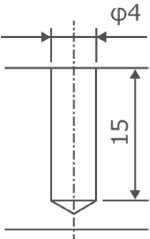 | 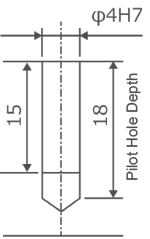 | 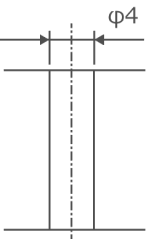 | 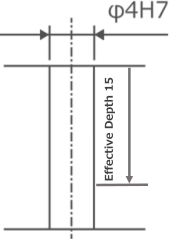 |
| Viewer Notation | ø4↧15 | ø4H7(+0.012/0) ↧15/Pilot Hole ↧18 | ø4 THRU | ø4H7(+0.012/0) ↧15/Pilot Hole Thru |
| Through/Blind | Blind | Through | |
|---|---|---|---|
| Hole diameter tolerance | No | Yes | Yes |
| Image | 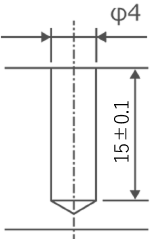 |
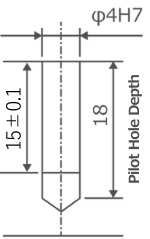 |
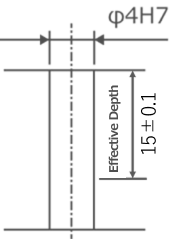 |
| Viewer Notation | Φ4↧15±0.1 (Flat bottom) | Φ4H7 (+0.012/0) ↧15±0.1 (Flat bottom)/Pilot Hole ↧18 | Φ4H7 (+0.012/0) ↧15±0.1/Pilot Hole Thru |
| Through/Blind | Blind | Through | ||
|---|---|---|---|---|
| Coarse/Fine | Coarse | Fine | Coarse | Fine |
| Image | 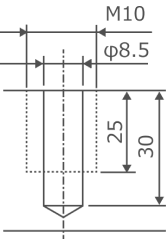 |
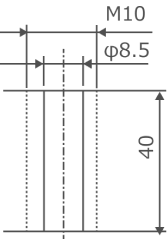 |
||
| Viewer Notation | M10↧25 | M10x1.25 ↧25/Pilot Hole ↧30 | M10 THRU | M10x1.25 THRU |
| Through/Blind | Blind | Through |
|---|---|---|
| Coarse/Fine | Coarse | Coarse |
| Image |  |
 |
| Viewer Notation | M10 INS-2D/Pilot Hole ↧30 | M4 INS-2D THRU |
| Through/Blind | Blind | Through |
|---|---|---|
| Precision | No | No |
| Image | 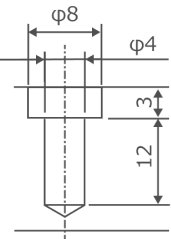 | 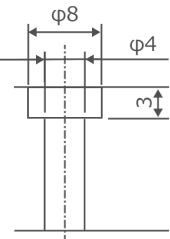 |
| Viewer Notation | 凵 ø8 ↧3 | 凵 ø8 ↧3 |
| ø4 ↧15 | ø4 THRU |
| Through/Blind | Blind |
|---|---|
| Precision | No |
| Image | 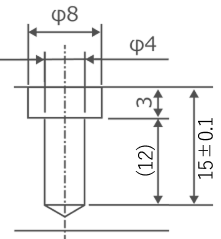 |
| Viewer Notation | 凵 ø8 ↧3 |
| Φ4↧15±0.1 (Flat bottom) |
| Through/Blind | Blind |
|---|---|
| Precision | No |
| Image |  |
| Viewer Notation | 凵ø8↧3 |
| ø4 THRU | |
| (On the opposite side)凵ø8↧3 |
| Through/Blind | Through |
|---|---|
| Image | 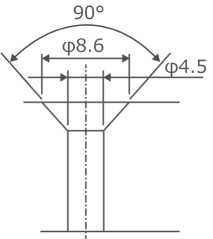 |
| Viewer notation |  ø8.6,
ø4.5 ø8.6,
ø4.5 |